For pubs, cafés, restaurants, salons and hotels in the UK and Ireland
Share tips to the penny, and keep the records
Turn your till’s tips export and your staff hours into exact shares, in the Google spreadsheet you already use. No evening with a calculator, and no arguments about where the odd penny went.
Free for up to 5 staff. Your data stays in your spreadsheet.
How it works
- 1Copy the two files from the install guide into your Google spreadsheet and reload it.
- 2Each period, import the tips from your till (or type them in) and paste in staff hours.
- 3Pick the rule, check and close the period; print the statements and pay the tips yourself.
It doesn't: pay the tips, work out tax or payroll, or give legal advice. You decide the split and make the payments.
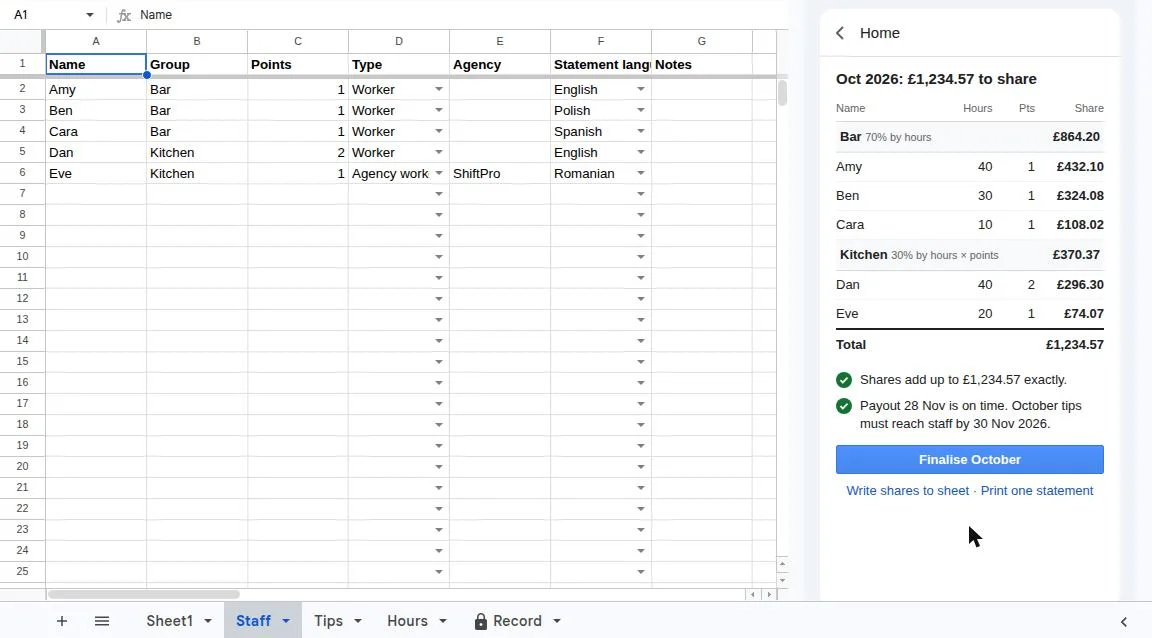
| Name | Group | Hours | Pts | Share |
|---|---|---|---|---|
| Amy | Bar | 40 | 1 | £432.10 |
| Ben | Bar | 30 | 1 | £324.08 |
| Cara | Bar | 10 | 1 | £108.02 |
| Dan | Kitchen | 40 | 2 | £296.30 |
| Eve | Kitchen | 20 | 1 | £74.07 |
| Total | £1,234.57 | |||
Shares add up to £1,234.57 exactly.
Payout on 28 Nov is on time.
Bar 70% by hours, Kitchen 30% by hours × points. A made-up pub.
How it works
- 1
Bring in the tips
Import the tips export from Square, SumUp, Teya, Lightspeed, Clover, Zettle or Dojo, or type them in. Add the cash jar as one row.
- 2
Paste the hours
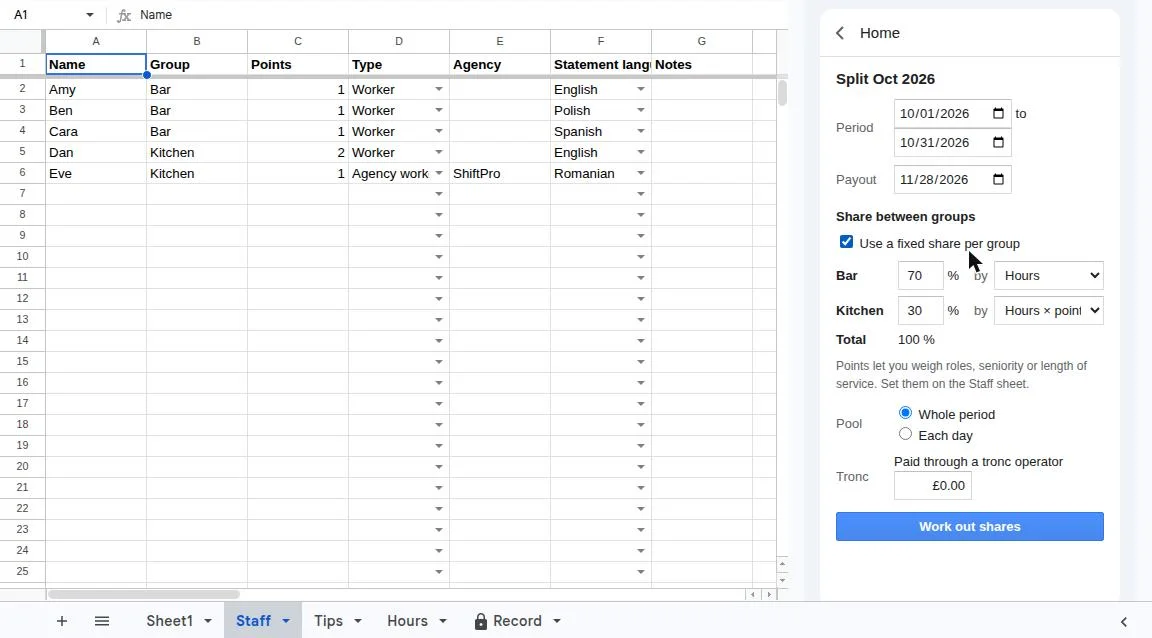
Paste the hours from your rota and pick how to share: equally, by hours, by role points, or both, with a fixed split between kitchen and front of house if you like.
- 3
Pay and keep the record
See every share to the penny, with a warning if the payout would be late. Finalise the month, copy the shares into payroll, and print a private statement for each person.
A statement each person understands
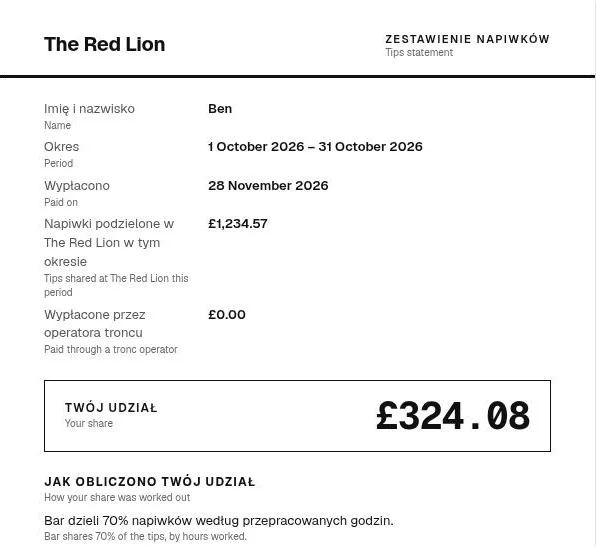
Each person gets a private statement with the venue’s total and their own share, and how it was worked out. It prints in English, Polish, Spanish, Portuguese, Romanian or Italian, with English underneath, so nobody has to ask what a line means.
- Only their own share, never anyone else’s
- Print one, or all of them at once with Pro
- Save as PDF or hand it out with payslips
The paperwork, done as you go
A record of every month
Each finalised period is kept in the Record sheet with a keep-until date. If someone edits it later, Tip Fair tells you.
Record requests answered
When a worker asks for their tips records, pick the person and the months, and print the reply letter with the totals and their own amounts.
Your policy and notice
Write your tipping policy in plain words in Great Britain, or print your tips notice for the counter and website in Ireland.
Who it’s for
Owners and managers who share tips between staff every week or month: pubs, cafés, restaurants, salons and hotels, from 3 people to 50.
If you already track hours in a spreadsheet, or pay tips through payroll, Tip Fair fits in the middle: tips and hours in, exact shares and records out.
Picking Ireland switches to euros and adds the Irish statement date and notice. Northern Ireland works as a plain splitter.
Prices
Pro is per venue, with unlimited staff. No fee on your tips, and no charge per employee.
Free
£0 for good
For small teams, with no time limit and no card.
Install free- Up to 5 people sharing tips in a period
- Tips from your till’s export, plus cash
- Equal, hours, points or hours × points, with group splits
- Shares to the penny, with the total always adding up
- The late-payout warning
- The record of every period
- One private statement at a time
Pro per venue
£6 a month
or £59 a year per venue, with unlimited staff.
See Pro- Everything in Free
- Unlimited staff
- Print every statement at once, in six languages
- The reply letter when a worker asks for their records
- Help writing your tipping policy (Great Britain)
- Your tips notice for the counter and website (Ireland)
- One venue (one spreadsheet) per licence
In Ireland, Pro is €7 a month or €69 a year. See Irish prices. Payment is handled by Freemius, our reseller.
Free tools and guides
Useful even if you never install Tip Fair.
Tip split calculator
Type the tips and hours, see every share to the penny.
Open →Tipping policy template
A written tips policy in plain words. Fill in, copy, print.
Open →Tip records and reply letter
What to keep for 3 years, and a letter for when staff ask.
Open →Split card tips from your till
Get tips out of SumUp, Square, Zettle or Clover and share them.
Open →Questions
How do I install it?
You copy two files into your spreadsheet’s Apps Script editor and reload. It takes about two minutes, and the install guide has a copy button for each file. Google asks you once for permission to let Tip Fair work in that spreadsheet.
Which tills does it read?
Square, SumUp, Teya, Lightspeed, Clover, Zettle and Dojo exports, or any CSV. Tip Fair finds the tips column by itself, and you add cash tips as one row. You can also type tips in. Here’s how to export tips from each one.
How does it share the tips?
Equally, by hours worked, by role points, or by hours times points. You can give each group a fixed part first, such as 70% for front of house and 30% for the kitchen. You choose the rule. Tip Fair works out the shares.
Why does the total always add up?
Every share is worked out in pennies, and the odd pennies left over go to the people whose exact shares were closest to the next penny. So the shares add up exactly to the tips, every time.
Does it help with the tipping law?
It helps you keep the records, warns you when a payout would be late, prints each person’s statement, writes the reply when a worker asks for their records, and helps you write your tipping policy, or your tips notice in Ireland. It isn’t legal advice, and you decide what is fair for your venue.
Who sees my staff data?
Nobody but you and the people you share the spreadsheet with. Everything stays in your Google spreadsheet. We never receive your staff names, hours or tips.
Does it work in Ireland and Northern Ireland?
Yes. Pick Ireland and Tip Fair works in euros, adds the 10-day statement date and builds your tips notice. Pick Northern Ireland and it works as a plain tips splitter with statements and records.
What does Google ask permission for?
Only two things: to see and edit the spreadsheet where you install Tip Fair, and no other file in your account, and to show its sidebar and menu there. It cannot read your email, your Drive or other spreadsheets.
How do I get updates?
Copy the two files again from the install guide. Your tips, staff and records stay as they are, because they live in the spreadsheet, not in the code.
What does free for up to 5 staff mean?
Up to 5 people with a share in each period. When a sixth person gets hours, Tip Fair offers Pro. One spreadsheet is one venue, so each venue needs its own Pro licence.
What happens if I stop paying?
You go back to the free version. Your spreadsheet and every record in it stay yours.
Tip Fair is a tool to help you share tips and keep records. It isn’t legal advice, and you decide what is fair for your venue.
Share this month’s tips in minutes
Free for up to 5 staff, in your own Google spreadsheet.